VTEX Personnalisation du style
Personnalisez le texte, les logos et le style de la méthode de paiement DEUNA dans VTEX.
Sur cette page
Configurez une expérience de paiement DEUNA dans VTEX.
Installez le connecteur certifié, configurez les conditions de paiement et enrichissez le checkout VTEX avec DEUNA Widget.
- Interface
- Checkout VTEX avec DEUNA Widget
- Mode de déploiement
- Configuration de l’application et du connecteur VTEX
- Idéal pour
- Marchands VTEX utilisant l’orchestration des paiements DEUNA
Personnaliser les éléments#
Apprendre à personnaliser les textes, logos et autres éléments de DEUNA dans VTEX:
- Modifier le nom par défaut du mode de paiement.
- Personnalisez les messages de sécurité et de paiement.
- Adaptez les logos.
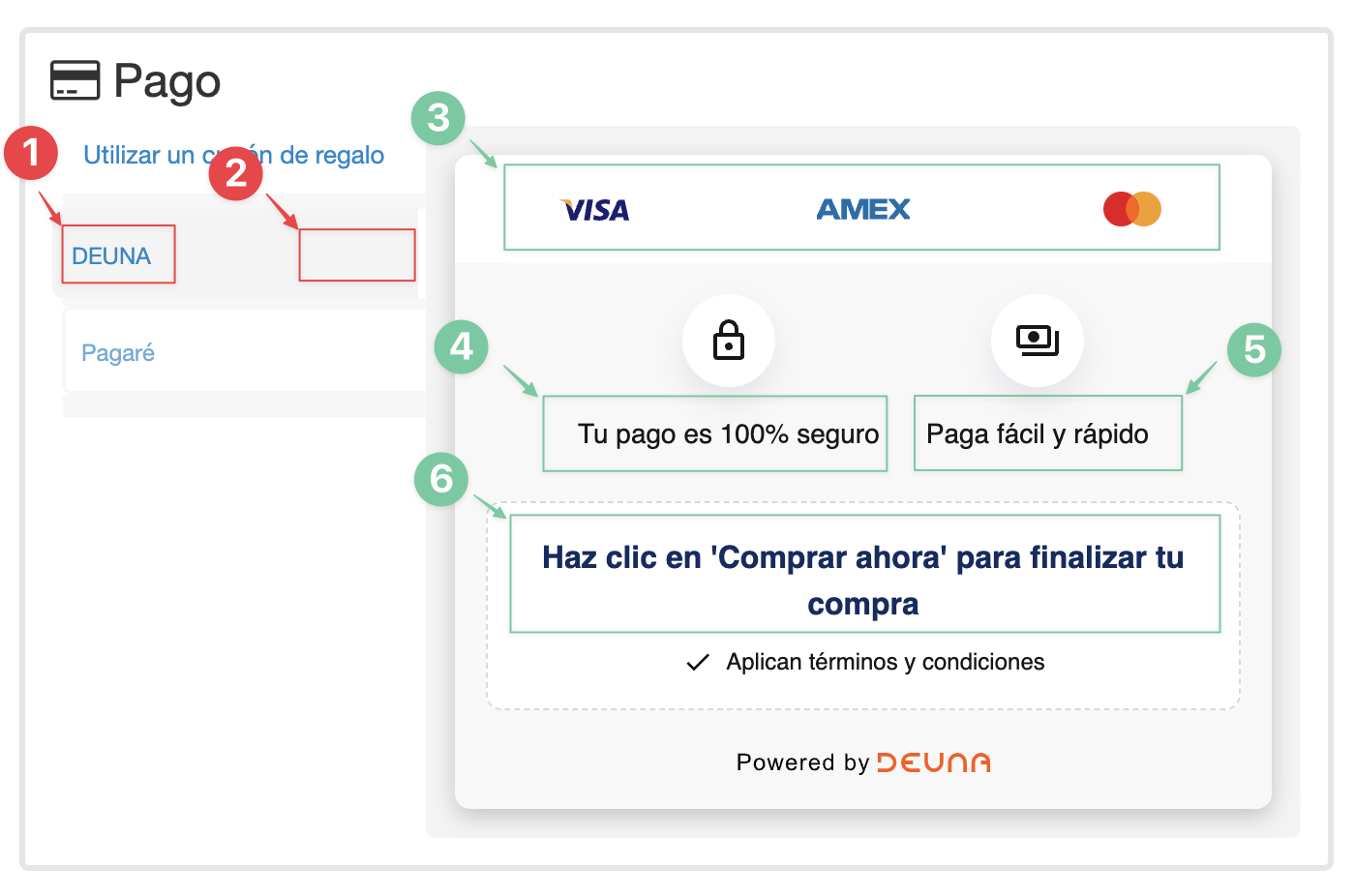
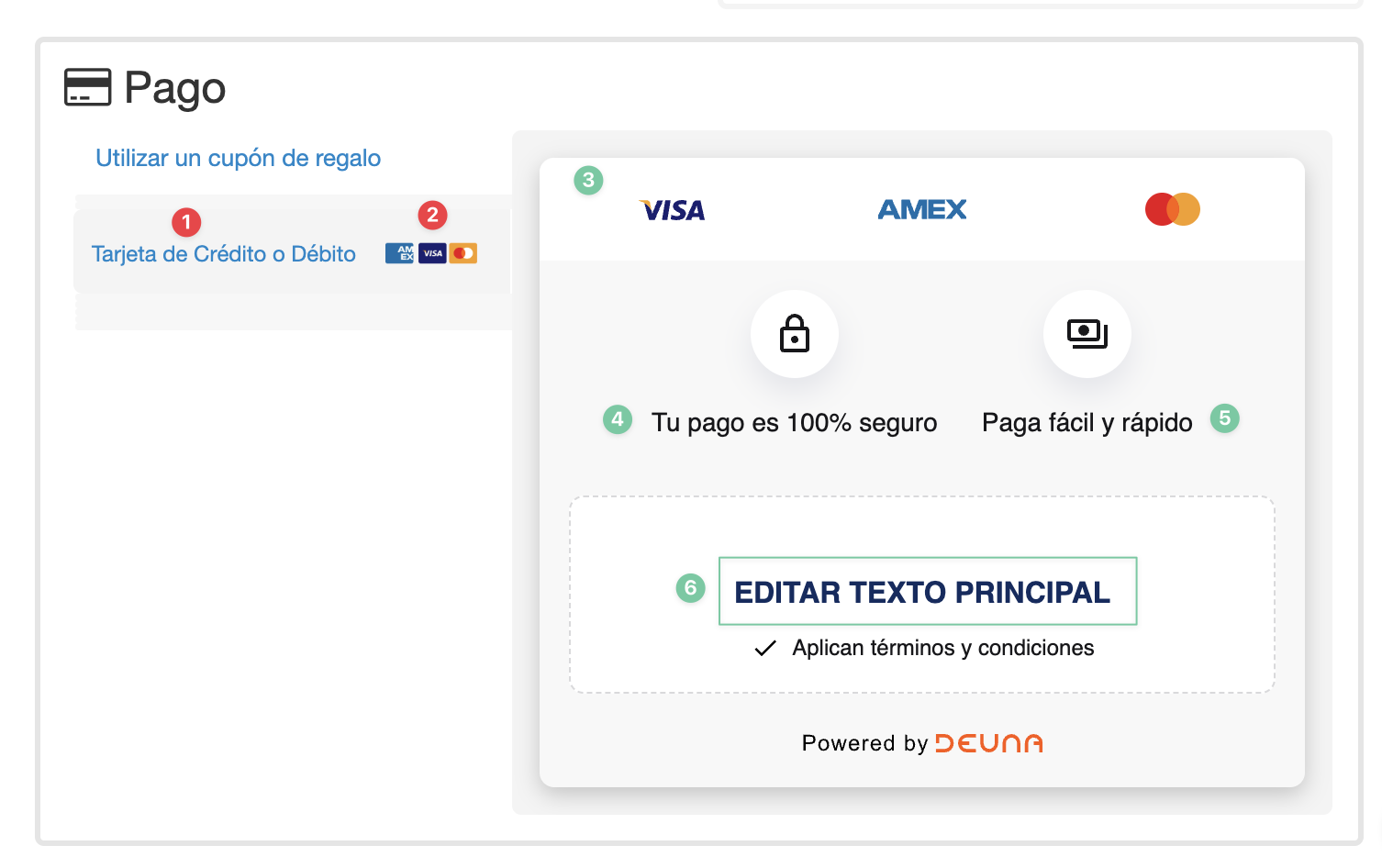
Liste des éléments personnalisables#
| # | Élément | Module | Description | Avantages |
|---|---|---|---|---|
| 1 | Nom du mode de paiement | Sélectionnez le mode de paiement | Modifie le texte du mode de paiement en «Payez avec une carte de crédit ou de débit». | Adapte la langue à votre entreprise, améliorant ainsi l'expérience de l'acheteur. |
| 2 | Configuration du logo Franchise | Sélectionnez le mode de paiement | Affiche à l'acheteur une petite liste de franchises supportées (AMEX, Visa, Mastercard). | Il fournit une clarté sur les cartes prises en charge, améliorant la confiance des clients et la conversion |
| 3 | Mettre à jour ou supprimer les logos | Détails du mode de paiement | Dites à l'acheteur quelles franchises sont disponibles si vous ne les utilisez pas toutes. | Évite toute confusion qui pourrait affecter l'expérience d'achat. |
| 4 | Mettre à jour le texte pour l'icône de verrouillage | Détails du mode de paiement | Changez le texte par défaut du cadenas en "Votre paiement est 100% sécurisé." | Renforce la sécurité des transactions, en alignant le message sur votre identité de marque. |
| 5 | Mettre à jour le texte pour l'icône argent | Détails du mode de paiement | Modifie le texte par défaut de l'argent en "Paiement rapide et facile. | Souligne la simplicité et la rapidité du processus de paiement, en alignant le message sur votre identité de marque. |
| 6 | Mettre à jour le texte principal dans les détails du mode de paiement DEUNA | Détails du mode de paiement | Modifie le texte principal pour renforcer l'appel à l'action, comme "Cliquez sur "Acheter maintenant" pour terminer votre achat. | Personnalisez l'appel à l'action pour améliorer la conversion lors de la sélection de DEUNA comme méthode de paiement. |
1. Modifier et copier le script#
Copiez et collez le script CSS suivant directement dans votre boutique VTEX pour personnaliser le mode de paiement DEUNA :
/* PASO 1: REEMPLAZAR TEXTO DEL TAB PARA MÉTODO DE PAGO DE DEUNA*/

#payment-group-DeunaNowPaymentGroup .payment-group-item-text {
    font-size: 0;
    background-position: right center;
    background-repeat: no-repeat;
    padding-right: inherit;
    line-height: 28px;
}

#payment-group-DeunaNowPaymentGroup .payment-group-item-text::after {
    content: "Tarjeta de Crédito o Débito"; /* PUEDES REEMPLEZAR ESTE TEXTO */
    font-size: 12px;
    line-height: 28px;
    color: inherit;
    display: inline-block;
    vertical-align: middle;
}

/* PASO 2: AGREGAR LOGOS DE TARJETAS EN EL TAB PARA MÉTODO DE PAGO DE DEUNA */

#payment-group-DeunaNowPaymentGroup .payment-group-item-text {
    background-image: url('https://io2.vtex.com/checkout-ui/v6.115.0/img/deuna-now/credit-card-logos.png'); /* URL DE LOS LOGS AMEX, VISA, MASTERCARD */
    background-size: 100px 40px;
    background-position: right center;
}

/* PASO 3: CAMBIAR LOS LOGOS PARA DETALLE DEL MÉTODO DE PAGO DE DEUNA */

/* LOGO VISA */
.deunaNow-payment-container .deunaNow-payments .deunaNow-payments-visa {
    background: url('https://io2.vtex.com/checkout-ui/v6.115.0/img/deuna-now/visa.svg') no-repeat;
    background-size: contain;
}

/* LOGO AMEX */
.deunaNow-payment-container .deunaNow-payments .deunaNow-payments-amex {
    background: url('https://io2.vtex.com/checkout-ui/v6.115.0/img/deuna-now/amex.svg') no-repeat;
    background-size: contain;
}

/* LOGO MASTERCARD */
.deunaNow-payment-container .deunaNow-payments .deunaNow-payments-mastercard {
    background: url('https://io2.vtex.com/checkout-ui/v6.115.0/img/deuna-now/mastercard.svg') no-repeat;
    background-size: contain;
}

/* PASO 4 y 5: CAMBIAR LOS TEXTOS EN EL DETALLE DEL MÉTODO DE PAGO DE DEUNA */

.deunaNow-payment-container .deunaNow-titles .deunaNow-item p[data-i18n="paymentData.paymentGroup.DeunaNow.paymentSecure"],
.deunaNow-payment-container .deunaNow-titles .deunaNow-item p[data-i18n="paymentData.paymentGroup.DeunaNow.fastPay"]
{
    font-size: 0;
}

/* CAMBIAR TEXTO PARA ICONO DE CANDADO */
.deunaNow-payment-container .deunaNow-titles .deunaNow-item p[data-i18n="paymentData.paymentGroup.DeunaNow.paymentSecure"]::after {
    content: "Tu pago es 100% seguro"; /* PUEDES REEMPLEZAR ESTE TEXTO */
    font-size: 14px;
    color: #17171a;
}

/* CAMBIAR TEXTO PARA ICONO DE DINERO */
.deunaNow-payment-container .deunaNow-titles .deunaNow-item p[data-i18n="paymentData.paymentGroup.DeunaNow.fastPay"]::after {
    content: "Paga fácil y rápido"; /* PUEDES REEMPLEZAR ESTE TEXTO */
    font-size: 14px;
    color: #17171a;
}


/* PASO 6: CAMBIAR TEXTO PRINCIPAL EN EL DETALLE DEL MÉTODO DE PAGO DE DEUNA */

.deunaNow-point-card p.deunaNow-title[data-i18n="paymentData.paymentGroup.DeunaNow.buyNow"]
{
    font-size: 0;
}

/* CAMBIAR TEXTO PARA 'Haz click en Comprar ahora para finalizar la compra' */
.deunaNow-point-card p.deunaNow-title[data-i18n="paymentData.paymentGroup.DeunaNow.buyNow"]::after {
    content: "Haz click en 'Comprar Ahora' para finalizar tu compra"; /* PUEDES REEMPLEZAR ESTE TEXTO */
    font-size: 16px;
    color: #102c60;
    display: block;
    text-align: center;
}/* PASSO 1: SUBSTITUIR TEXTO DA ABA PARA MÉTODO DE PAGAMENTO DE DEUNA */
#payment-group-DeunaNowPaymentGroup .payment-group-item-text {
font-size: 0;
background-position: right center;
background-repeat: no-repeat;
padding-right: inherit;
line-height: 28px;
}
#payment-group-DeunaNowPaymentGroup .payment-group-item-text::after {
content: "Cartão de Crédito ou Débito"; /* VOCÊ PODE SUBSTITUIR ESTE TEXTO */
font-size: 12px;
line-height: 28px;
color: inherit;
display: inline-block;
vertical-align: middle;
}
/* PASSO 2: ADICIONAR LOGOS DE CARTÕES NA ABA PARA MÉTODO DE PAGAMENTO DE DEUNA */
#payment-group-DeunaNowPaymentGroup .payment-group-item-text {
background-image: url('https://io2.vtex.com/checkout-ui/v6.115.0/img/deuna-now/credit-card-logos.png'); /* URL DOS LOGOS AMEX, VISA, MASTERCARD */
background-size: 100px 40px;
background-position: right center;
}
/* PASSO 3: ALTERAR OS LOGOS PARA DETALHE DO MÉTODO DE PAGAMENTO DE DEUNA */
/* LOGO VISA */
.deunaNow-payment-container .deunaNow-payments .deunaNow-payments-visa {
background: url('https://io2.vtex.com/checkout-ui/v6.115.0/img/deuna-now/visa.svg') no-repeat;
background-size: contain;
}
/* LOGO AMEX */
.deunaNow-payment-container .deunaNow-payments .deunaNow-payments-amex {
background: url('https://io2.vtex.com/checkout-ui/v6.115.0/img/deuna-now/amex.svg') no-repeat;
background-size: contain;
}
/* LOGO MASTERCARD */
.deunaNow-payment-container .deunaNow-payments .deunaNow-payments-mastercard {
background: url('https://io2.vtex.com/checkout-ui/v6.115.0/img/deuna-now/mastercard.svg') no-repeat;
background-size: contain;
}
/* PASSOS 4 e 5: ALTERAR OS TEXTOS NO DETALHE DO MÉTODO DE PAGAMENTO DE DEUNA */
.deunaNow-payment-container .deunaNow-titles .deunaNow-item p[data-i18n="paymentData.paymentGroup.DeunaNow.paymentSecure"],
.deunaNow-payment-container .deunaNow-titles .deunaNow-item p[data-i18n="paymentData.paymentGroup.DeunaNow.fastPay"]
{
font-size: 0;
}
/* ALTERAR TEXTO PARA ÍCONE DE CADEADO */
.deunaNow-payment-container .deunaNow-titles .deunaNow-item p[data-i18n="paymentData.paymentGroup.DeunaNow.paymentSecure"]::after {
content: "Seu pagamento é 100% seguro"; /* VOCÊ PODE SUBSTITUIR ESTE TEXTO */
font-size: 14px;
color: #17171a;
}
/* ALTERAR TEXTO PARA ÍCONE DE DINHEIRO */
.deunaNow-payment-container .deunaNow-titles .deunaNow-item p[data-i18n="paymentData.paymentGroup.DeunaNow.fastPay"]::after {
content: "Pague fácil e rápido"; /* VOCÊ PODE SUBSTITUIR ESTE TEXTO */
font-size: 14px;
color: #17171a;
}
/* PASSO 6: ALTERAR TEXTO PRINCIPAL NO DETALHE DO MÉTODO DE PAGAMENTO DE DEUNA */
.deunaNow-point-card p.deunaNow-title[data-i18n="paymentData.paymentGroup.DeunaNow.buyNow"]
{
font-size: 0;
}
/* ALTERAR TEXTO PARA 'Clique em Comprar Agora para finalizar sua compra' */
.deunaNow-point-card p.deunaNow-title[data-i18n="paymentData.paymentGroup.DeunaNow.buyNow"]::after {
content: "Clique em 'Comprar Agora' para finalizar sua compra"; /* VOCÊ PODE SUBSTITUIR ESTE TEXTO */
font-size: 16px;
color: #102c60;
display: block;
text-align: center;
}/* STEP 1: REPLACE TAB TEXT FOR DEUNA PAYMENT METHOD */
#payment-group-DeunaNowPaymentGroup .payment-group-item-text {
font-size: 0;
background-position: right center;
background-repeat: no-repeat;
padding-right: inherit;
line-height: 28px;
}
#payment-group-DeunaNowPaymentGroup .payment-group-item-text::after {
content: "Credit or Debit Card"; /* YOU CAN REPLACE THIS TEXT */
font-size: 12px;
line-height: 28px;
color: inherit;
display: inline-block;
vertical-align: middle;
}
/* STEP 2: ADD CARD LOGOS TO TAB FOR DEUNA PAYMENT METHOD */
#payment-group-DeunaNowPaymentGroup .payment-group-item-text {
background-image: url('https://io2.vtex.com/checkout-ui/v6.115.0/img/deuna-now/credit-card-logos.png'); /* URL FOR AMEX, VISA, MASTERCARD LOGOS */
background-size: 100px 40px;
background-position: right center;
}
/* STEP 3: CHANGE LOGOS FOR DEUNA PAYMENT METHOD DETAILS */
/* VISA LOGO */
.deunaNow-payment-container .deunaNow-payments .deunaNow-payments-visa {
background: url('https://io2.vtex.com/checkout-ui/v6.115.0/img/deuna-now/visa.svg') no-repeat;
background-size: contain;
}
/* AMEX LOGO */
.deunaNow-payment-container .deunaNow-payments .deunaNow-payments-amex {
background: url('https://io2.vtex.com/checkout-ui/v6.115.0/img/deuna-now/amex.svg') no-repeat;
background-size: contain;
}
/* MASTERCARD LOGO */
.deunaNow-payment-container .deunaNow-payments .deunaNow-payments-mastercard {
background: url('https://io2.vtex.com/checkout-ui/v6.115.0/img/deuna-now/mastercard.svg') no-repeat;
background-size: contain;
}
/* STEPS 4 & 5: CHANGE TEXTS IN THE DETAILS FOR DEUNA PAYMENT METHOD */
.deunaNow-payment-container .deunaNow-titles .deunaNow-item p[data-i18n="paymentData.paymentGroup.DeunaNow.paymentSecure"],
.deunaNow-payment-container .deunaNow-titles .deunaNow-item p[data-i18n="paymentData.paymentGroup.DeunaNow.fastPay"]
{
font-size: 0;
}
/* CHANGE TEXT FOR LOCK ICON */
.deunaNow-payment-container .deunaNow-titles .deunaNow-item p[data-i18n="paymentData.paymentGroup.DeunaNow.paymentSecure"]::after {
content: "Your payment is 100% secure"; /* YOU CAN REPLACE THIS TEXT */
font-size: 14px;
color: #17171a;
}
/* CHANGE TEXT FOR MONEY ICON */
.deunaNow-payment-container .deunaNow-titles .deunaNow-item p[data-i18n="paymentData.paymentGroup.DeunaNow.fastPay"]::after {
content: "Pay easily and quickly"; /* YOU CAN REPLACE THIS TEXT */
font-size: 14px;
color: #17171a;
}
/* STEP 6: CHANGE MAIN TEXT IN THE DETAILS FOR DEUNA PAYMENT METHOD */
.deunaNow-point-card p.deunaNow-title[data-i18n="paymentData.paymentGroup.DeunaNow.buyNow"]
{
font-size: 0;
}
/* CHANGE TEXT FOR 'Click Buy Now to complete your purchase' */
.deunaNow-point-card p.deunaNow-title[data-i18n="paymentData.paymentGroup.DeunaNow.buyNow"]::after {
content: "Click 'Buy Now' to complete your purchase"; /* YOU CAN REPLACE THIS TEXT */
font-size: 16px;
color: #102c60;
display: block;
text-align: center;
}2. Installez le script dans votre magasin#
Coller le script modifié dans le CSS de votre magasin :
- Dans l'administration VTEX, allez dans Paramètres de stockage > En avant-première > Départ
- Sélectionnez votre magasin et cliquez sur le bouton bleu
- Sélectionnez l'onglet Code et sélectionnez le fichier checkout6-custom.css.
- Coller le script.
- Enregistrez les changements.
Pour l'interface utilisateur de départ personnalisé :
- Accède à l'administrateur VTEX
- Aller à Paramètres de stockage > Storefront → Commander l'interface utilisateur personnalisée
- Collez le code que vous avez copié plus tôt.
- Enregistrez les changements.
3. Essai avant l ' installation#
Effectuez des tests dans votre navigateur avant d'appliquer le script de façon permanente.
- Allez voir l'inspecteur.
- Faites un clic droit sur la page et sélectionnez Inspecter Ceci ouvrira la console du navigateur.
- Allez-y. Sources.
- Dans le >> Des flèches. Sélectionner Espaces de travail.
- Sélectionnez Ajouter un dossier pour surcharger le fichier de Chrome.
- Ajoutez un dossier local et donnez à votre navigateur accès pour enregistrer les informations..
- Accédez à
Pagos > Tu Dominio > files > custom-checkout6.css. - Essayez le script :
- Coller le script dans le fichier et enregistrer les modifications.
- Rafraîchir la page pour vérifier la fonctionnalité sans apporter de changements permanents.
Explicación del script#
Personnaliser les éléments#
Vous pouvez maintenant personnaliser des éléments à l'intérieur de DEUNA dans VTEX.
1. Remplacer le texte TAB par le mode de paiement DEUNA.
/* PASO 1: REEMPLAZAR TEXTO DEL TAB PARA MÉTODO DE PAGO DE DEUNA*/

#payment-group-DeunaNowPaymentGroup .payment-group-item-text {
    font-size: 0;
    background-position: right center;
    background-repeat: no-repeat;
    padding-right: inherit;
    line-height: 28px;
}

#payment-group-DeunaNowPaymentGroup .payment-group-item-text::after {
    content: "Tarjeta de Crédito o Débito"; /* PUEDES REEMPLEZAR ESTE TEXTO */
    font-size: 12px;
    line-height: 28px;
    color: inherit;
    display: inline-block;
    vertical-align: middle;
}/* PASSO 1: SUBSTITUIR TEXTO DA ABA PARA MÉTODO DE PAGAMENTO DE DEUNA */
#payment-group-DeunaNowPaymentGroup .payment-group-item-text {
font-size: 0;
background-position: right center;
background-repeat: no-repeat;
padding-right: inherit;
line-height: 28px;
}
#payment-group-DeunaNowPaymentGroup .payment-group-item-text::after {
content: "Cartão de Crédito ou Débito"; /* VOCÊ PODE SUBSTITUIR ESTE TEXTO */
font-size: 12px;
line-height: 28px;
color: inherit;
display: inline-block;
vertical-align: middle;
}/* STEP 1: REPLACE TAB TEXT FOR DEUNA PAYMENT METHOD */
#payment-group-DeunaNowPaymentGroup .payment-group-item-text {
font-size: 0;
background-position: right center;
background-repeat: no-repeat;
padding-right: inherit;
line-height: 28px;
}
#payment-group-DeunaNowPaymentGroup .payment-group-item-text::after {
content: "Credit or Debit Card"; /* YOU CAN REPLACE THIS TEXT */
font-size: 12px;
line-height: 28px;
color: inherit;
display: inline-block;
vertical-align: middle;
}2. Ajoutez des logos de carte
Ajoutez des logos de carte à l'onglet pour le mode de paiement DEUNA..
/* PASO 2: AGREGAR LOGOS DE TARJETAS EN EL TAB PARA MÉTODO DE PAGO DE DEUNA */

#payment-group-DeunaNowPaymentGroup .payment-group-item-text {
    background-image: url('https://io2.vtex.com/checkout-ui/v6.115.0/img/deuna-now/credit-card-logos.png'); /* URL DE LOS LOGS AMEX, VISA, MASTERCARD */
    background-size: 100px 40px;
    background-position: right center;
}/* PASSO 2: ADICIONAR LOGOS DE CARTÕES NA ABA PARA MÉTODO DE PAGAMENTO DE DEUNA */
#payment-group-DeunaNowPaymentGroup .payment-group-item-text {
background-image: url('https://io2.vtex.com/checkout-ui/v6.115.0/img/deuna-now/credit-card-logos.png'); /* URL DOS LOGOS AMEX, VISA, MASTERCARD */
background-size: 100px 40px;
background-position: right center;
}/* STEP 2: ADD CARD LOGOS TO TAB FOR DEUNA PAYMENT METHOD */
#payment-group-DeunaNowPaymentGroup .payment-group-item-text {
background-image: url('https://io2.vtex.com/checkout-ui/v6.115.0/img/deuna-now/credit-card-logos.png'); /* URL FOR AMEX, VISA, MASTERCARD LOGOS */
background-size: 100px 40px;
background-position: right center;
}3. Modifier les logos
Modifier les logos pour les détails du mode de paiement DEUNA.
/* PASO 3: CAMBIAR LOS LOGOS PARA DETALLE DEL MÉTODO DE PAGO DE DEUNA */

/* LOGO VISA */
.deunaNow-payment-container .deunaNow-payments .deunaNow-payments-visa {
    background: url('https://io2.vtex.com/checkout-ui/v6.115.0/img/deuna-now/visa.svg') no-repeat;
    background-size: contain;
}

/* LOGO AMEX */
.deunaNow-payment-container .deunaNow-payments .deunaNow-payments-amex {
    background: url('https://io2.vtex.com/checkout-ui/v6.115.0/img/deuna-now/amex.svg') no-repeat;
    background-size: contain;
}

/* LOGO MASTERCARD */
.deunaNow-payment-container .deunaNow-payments .deunaNow-payments-mastercard {
    background: url('https://io2.vtex.com/checkout-ui/v6.115.0/img/deuna-now/mastercard.svg') no-repeat;
    background-size: contain;
}/* PASSO 3: ALTERAR OS LOGOS PARA DETALHE DO MÉTODO DE PAGAMENTO DE DEUNA */
/* LOGO VISA */
.deunaNow-payment-container .deunaNow-payments .deunaNow-payments-visa {
background: url('https://io2.vtex.com/checkout-ui/v6.115.0/img/deuna-now/visa.svg') no-repeat;
background-size: contain;
}
/* LOGO AMEX */
.deunaNow-payment-container .deunaNow-payments .deunaNow-payments-amex {
background: url('https://io2.vtex.com/checkout-ui/v6.115.0/img/deuna-now/amex.svg') no-repeat;
background-size: contain;
}
/* LOGO MASTERCARD */
.deunaNow-payment-container .deunaNow-payments .deunaNow-payments-mastercard {
background: url('https://io2.vtex.com/checkout-ui/v6.115.0/img/deuna-now/mastercard.svg') no-repeat;
background-size: contain;
}/* STEP 3: CHANGE LOGOS FOR DEUNA PAYMENT METHOD DETAILS */
/* VISA LOGO */
.deunaNow-payment-container .deunaNow-payments .deunaNow-payments-visa {
background: url('https://io2.vtex.com/checkout-ui/v6.115.0/img/deuna-now/visa.svg') no-repeat;
background-size: contain;
}
/* AMEX LOGO */
.deunaNow-payment-container .deunaNow-payments .deunaNow-payments-amex {
background: url('https://io2.vtex.com/checkout-ui/v6.115.0/img/deuna-now/amex.svg') no-repeat;
background-size: contain;
}
/* MASTERCARD LOGO */
.deunaNow-payment-container .deunaNow-payments .deunaNow-payments-mastercard {
background: url('https://io2.vtex.com/checkout-ui/v6.115.0/img/deuna-now/mastercard.svg') no-repeat;
background-size: contain;
}4. Texte de la déclaration de détail
Modifier les textes dans les détails du mode de paiement DEUNA..
/* PASO 4 y 5: CAMBIAR LOS TEXTOS EN EL DETALLE DEL MÉTODO DE PAGO DE DEUNA */

.deunaNow-payment-container .deunaNow-titles .deunaNow-item p[data-i18n="paymentData.paymentGroup.DeunaNow.paymentSecure"],
.deunaNow-payment-container .deunaNow-titles .deunaNow-item p[data-i18n="paymentData.paymentGroup.DeunaNow.fastPay"]
{
    font-size: 0;
}

/* CAMBIAR TEXTO PARA ICONO DE CANDADO */
.deunaNow-payment-container .deunaNow-titles .deunaNow-item p[data-i18n="paymentData.paymentGroup.DeunaNow.paymentSecure"]::after {
    content: "Tu pago es 100% seguro"; /* PUEDES REEMPLEZAR ESTE TEXTO */
    font-size: 14px;
    color: #17171a;
}

/* CAMBIAR TEXTO PARA ICONO DE DINERO */
.deunaNow-payment-container .deunaNow-titles .deunaNow-item p[data-i18n="paymentData.paymentGroup.DeunaNow.fastPay"]::after {
    content: "Paga fácil y rápido"; /* PUEDES REEMPLEZAR ESTE TEXTO */
    font-size: 14px;
    color: #17171a;
}/* PASSOS 4 e 5: ALTERAR OS TEXTOS NO DETALHE DO MÉTODO DE PAGAMENTO DE DEUNA */
.deunaNow-payment-container .deunaNow-titles .deunaNow-item p[data-i18n="paymentData.paymentGroup.DeunaNow.paymentSecure"],
.deunaNow-payment-container .deunaNow-titles .deunaNow-item p[data-i18n="paymentData.paymentGroup.DeunaNow.fastPay"]
{
font-size: 0;
}
/* ALTERAR TEXTO PARA ÍCONE DE CADEADO */
.deunaNow-payment-container .deunaNow-titles .deunaNow-item p[data-i18n="paymentData.paymentGroup.DeunaNow.paymentSecure"]::after {
content: "Seu pagamento é 100% seguro"; /* VOCÊ PODE SUBSTITUIR ESTE TEXTO */
font-size: 14px;
color: #17171a;
}
/* ALTERAR TEXTO PARA ÍCONE DE DINHEIRO */
.deunaNow-payment-container .deunaNow-titles .deunaNow-item p[data-i18n="paymentData.paymentGroup.DeunaNow.fastPay"]::after {
content: "Pague fácil e rápido"; /* VOCÊ PODE SUBSTITUIR ESTE TEXTO */
font-size: 14px;
color: #17171a;
}/* STEPS 4 & 5: CHANGE TEXTS IN THE DETAILS FOR DEUNA PAYMENT METHOD */
.deunaNow-payment-container .deunaNow-titles .deunaNow-item p[data-i18n="paymentData.paymentGroup.DeunaNow.paymentSecure"],
.deunaNow-payment-container .deunaNow-titles .deunaNow-item p[data-i18n="paymentData.paymentGroup.DeunaNow.fastPay"]
{
font-size: 0;
}
/* CHANGE TEXT FOR LOCK ICON */
.deunaNow-payment-container .deunaNow-titles .deunaNow-item p[data-i18n="paymentData.paymentGroup.DeunaNow.paymentSecure"]::after {
content: "Your payment is 100% secure"; /* YOU CAN REPLACE THIS TEXT */
font-size: 14px;
color: #17171a;
}
/* CHANGE TEXT FOR MONEY ICON */
.deunaNow-payment-container .deunaNow-titles .deunaNow-item p[data-i18n="paymentData.paymentGroup.DeunaNow.fastPay"]::after {
content: "Pay easily and quickly"; /* YOU CAN REPLACE THIS TEXT */
font-size: 14px;
color: #17171a;
}5. Modifier le texte principal
Modifier le texte principal dans les détails du mode de paiement DEUNA..
/* PASO 6: CAMBIAR TEXTO PRINCIPAL EN EL DETALLE DEL MÉTODO DE PAGO DE DEUNA */

.deunaNow-point-card p.deunaNow-title[data-i18n="paymentData.paymentGroup.DeunaNow.buyNow"]
{
    font-size: 0;
}

/* CAMBIAR TEXTO PARA 'Haz click en Comprar ahora para finalizar la compra' */
.deunaNow-point-card p.deunaNow-title[data-i18n="paymentData.paymentGroup.DeunaNow.buyNow"]::after {
    content: "Haz click en 'Comprar Ahora' para finalizar tu compra"; /* PUEDES REEMPLEZAR ESTE TEXTO */
    font-size: 16px;
    color: #102c60;
    display: block;
    text-align: center;
}/* PASSO 6: ALTERAR TEXTO PRINCIPAL NO DETALHE DO MÉTODO DE PAGAMENTO DE DEUNA */
.deunaNow-point-card p.deunaNow-title[data-i18n="paymentData.paymentGroup.DeunaNow.buyNow"]
{
font-size: 0;
}
/* ALTERAR TEXTO PARA 'Clique em Comprar Agora para finalizar sua compra' */
.deunaNow-point-card p.deunaNow-title[data-i18n="paymentData.paymentGroup.DeunaNow.buyNow"]::after {
content: "Clique em 'Comprar Agora' para finalizar sua compra"; /* VOCÊ PODE SUBSTITUIR ESTE TEXTO */
font-size: 16px;
color: #102c60;
display: block;
text-align: center;
}/* STEP 6: CHANGE MAIN TEXT IN THE DETAILS FOR DEUNA PAYMENT METHOD */
.deunaNow-point-card p.deunaNow-title[data-i18n="paymentData.paymentGroup.DeunaNow.buyNow"]
{
font-size: 0;
}
/* CHANGE TEXT FOR 'Click Buy Now to complete your purchase' */
.deunaNow-point-card p.deunaNow-title[data-i18n="paymentData.paymentGroup.DeunaNow.buyNow"]::after {
content: "Click 'Buy Now' to complete your purchase"; /* YOU CAN REPLACE THIS TEXT */
font-size: 16px;
color: #102c60;
display: block;
text-align: center;
}