VTEX Style customization
Customize DEUNA payment method text, logos, and styling in VTEX.
On this page
Configure a DEUNA-powered payment experience inside VTEX.
Install the certified connector, configure payment terms, and extend VTEX checkout with DEUNA Widget capabilities.
- Interface
- VTEX checkout with DEUNA Widget
- Delivery model
- VTEX app and connector configuration
- Best for
- VTEX merchants using DEUNA payment orchestration
Customize elements#
Learn to customize texts, logos, and other elements of DEUNA in VTEX:
- Change the default name of the payment method.
- Customize security and payment messages.
- Adapt logos.
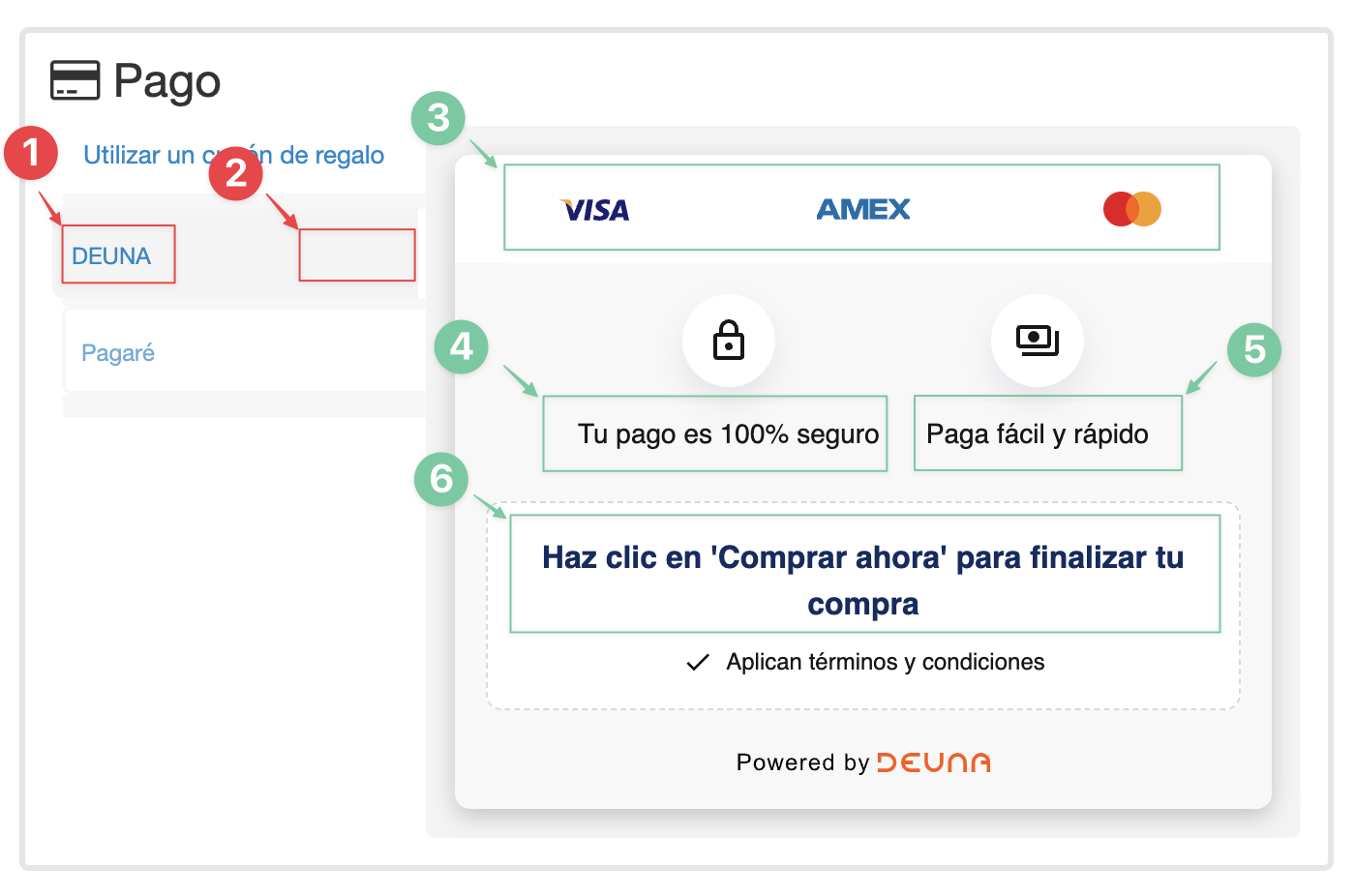
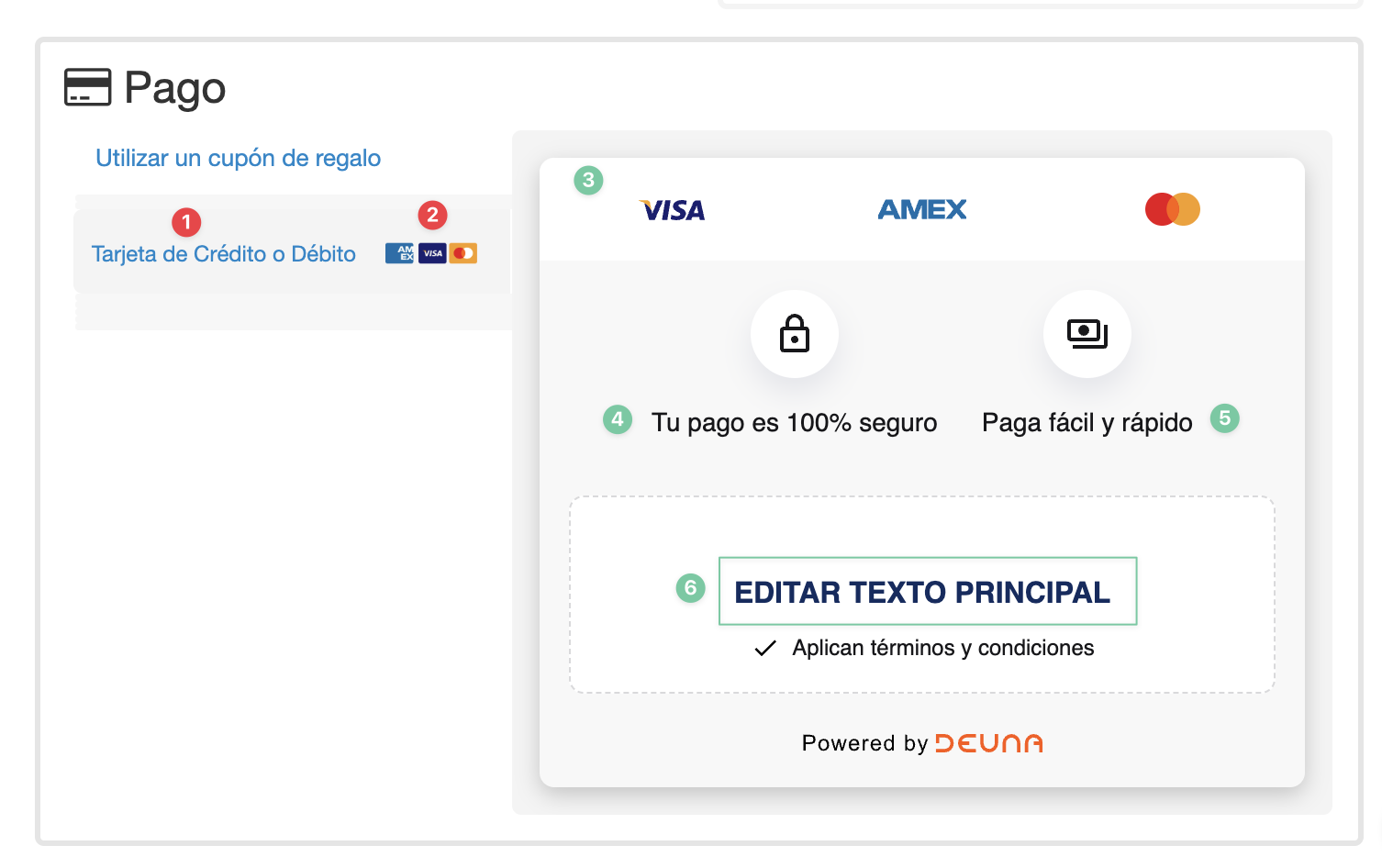
List of Customizable Elements#
| # | Element | Module | Descripion | Benefits |
|---|---|---|---|---|
| 1 | Payment method name | Select payment method | Modifies the payment method text to "Pay with credit or debit card." | Adapts the language to your business, improving the buyer's experience. |
| 2 | Franchise logo configuration | Select payment method | Shows the buyer a small list of supported franchises (AMEX, Visa, Mastercard). | Provides clarity about supported cards, enhancing customer trust and conversion |
| 3 | Update or remove logos | Payment method details | Tell the buyer what franchises are available if you don't use them all. | Avoids confusion that could affect the shopping experience. |
| 4 | Update text for lock icon | Payment method details | Change the default padlock text to "Your payment is 100% secure." | Reinforces transaction security, aligning the message with your brand identity. |
| 5 | Update text for money icon | Payment method details | Modifies the default money text to "Fast and easy payment. | Emphasizes the simplicity and speed of the payment process, aligning the message with your brand identity. |
| 6 | Update main text in DEUNA payment method details | Payment method details | Modifies the main text to reinforce the call to action, such as "Click 'Buy Now' to complete your purchase. | Customize the call to action to improve conversion when selecting DEUNA as a payment method. |
1. Modify and copy the script#
Copy and paste the following CSS script directly into your VTEX store to customize the DEUNA payment method:
/* PASO 1: REEMPLAZAR TEXTO DEL TAB PARA MÉTODO DE PAGO DE DEUNA*/

#payment-group-DeunaNowPaymentGroup .payment-group-item-text {
    font-size: 0;
    background-position: right center;
    background-repeat: no-repeat;
    padding-right: inherit;
    line-height: 28px;
}

#payment-group-DeunaNowPaymentGroup .payment-group-item-text::after {
    content: "Tarjeta de Crédito o Débito"; /* PUEDES REEMPLEZAR ESTE TEXTO */
    font-size: 12px;
    line-height: 28px;
    color: inherit;
    display: inline-block;
    vertical-align: middle;
}

/* PASO 2: AGREGAR LOGOS DE TARJETAS EN EL TAB PARA MÉTODO DE PAGO DE DEUNA */

#payment-group-DeunaNowPaymentGroup .payment-group-item-text {
    background-image: url('https://io2.vtex.com/checkout-ui/v6.115.0/img/deuna-now/credit-card-logos.png'); /* URL DE LOS LOGS AMEX, VISA, MASTERCARD */
    background-size: 100px 40px;
    background-position: right center;
}

/* PASO 3: CAMBIAR LOS LOGOS PARA DETALLE DEL MÉTODO DE PAGO DE DEUNA */

/* LOGO VISA */
.deunaNow-payment-container .deunaNow-payments .deunaNow-payments-visa {
    background: url('https://io2.vtex.com/checkout-ui/v6.115.0/img/deuna-now/visa.svg') no-repeat;
    background-size: contain;
}

/* LOGO AMEX */
.deunaNow-payment-container .deunaNow-payments .deunaNow-payments-amex {
    background: url('https://io2.vtex.com/checkout-ui/v6.115.0/img/deuna-now/amex.svg') no-repeat;
    background-size: contain;
}

/* LOGO MASTERCARD */
.deunaNow-payment-container .deunaNow-payments .deunaNow-payments-mastercard {
    background: url('https://io2.vtex.com/checkout-ui/v6.115.0/img/deuna-now/mastercard.svg') no-repeat;
    background-size: contain;
}

/* PASO 4 y 5: CAMBIAR LOS TEXTOS EN EL DETALLE DEL MÉTODO DE PAGO DE DEUNA */

.deunaNow-payment-container .deunaNow-titles .deunaNow-item p[data-i18n="paymentData.paymentGroup.DeunaNow.paymentSecure"],
.deunaNow-payment-container .deunaNow-titles .deunaNow-item p[data-i18n="paymentData.paymentGroup.DeunaNow.fastPay"]
{
    font-size: 0;
}

/* CAMBIAR TEXTO PARA ICONO DE CANDADO */
.deunaNow-payment-container .deunaNow-titles .deunaNow-item p[data-i18n="paymentData.paymentGroup.DeunaNow.paymentSecure"]::after {
    content: "Tu pago es 100% seguro"; /* PUEDES REEMPLEZAR ESTE TEXTO */
    font-size: 14px;
    color: #17171a;
}

/* CAMBIAR TEXTO PARA ICONO DE DINERO */
.deunaNow-payment-container .deunaNow-titles .deunaNow-item p[data-i18n="paymentData.paymentGroup.DeunaNow.fastPay"]::after {
    content: "Paga fácil y rápido"; /* PUEDES REEMPLEZAR ESTE TEXTO */
    font-size: 14px;
    color: #17171a;
}


/* PASO 6: CAMBIAR TEXTO PRINCIPAL EN EL DETALLE DEL MÉTODO DE PAGO DE DEUNA */

.deunaNow-point-card p.deunaNow-title[data-i18n="paymentData.paymentGroup.DeunaNow.buyNow"]
{
    font-size: 0;
}

/* CAMBIAR TEXTO PARA 'Haz click en Comprar ahora para finalizar la compra' */
.deunaNow-point-card p.deunaNow-title[data-i18n="paymentData.paymentGroup.DeunaNow.buyNow"]::after {
    content: "Haz click en 'Comprar Ahora' para finalizar tu compra"; /* PUEDES REEMPLEZAR ESTE TEXTO */
    font-size: 16px;
    color: #102c60;
    display: block;
    text-align: center;
}/* PASSO 1: SUBSTITUIR TEXTO DA ABA PARA MÉTODO DE PAGAMENTO DE DEUNA */
#payment-group-DeunaNowPaymentGroup .payment-group-item-text {
font-size: 0;
background-position: right center;
background-repeat: no-repeat;
padding-right: inherit;
line-height: 28px;
}
#payment-group-DeunaNowPaymentGroup .payment-group-item-text::after {
content: "Cartão de Crédito ou Débito"; /* VOCÊ PODE SUBSTITUIR ESTE TEXTO */
font-size: 12px;
line-height: 28px;
color: inherit;
display: inline-block;
vertical-align: middle;
}
/* PASSO 2: ADICIONAR LOGOS DE CARTÕES NA ABA PARA MÉTODO DE PAGAMENTO DE DEUNA */
#payment-group-DeunaNowPaymentGroup .payment-group-item-text {
background-image: url('https://io2.vtex.com/checkout-ui/v6.115.0/img/deuna-now/credit-card-logos.png'); /* URL DOS LOGOS AMEX, VISA, MASTERCARD */
background-size: 100px 40px;
background-position: right center;
}
/* PASSO 3: ALTERAR OS LOGOS PARA DETALHE DO MÉTODO DE PAGAMENTO DE DEUNA */
/* LOGO VISA */
.deunaNow-payment-container .deunaNow-payments .deunaNow-payments-visa {
background: url('https://io2.vtex.com/checkout-ui/v6.115.0/img/deuna-now/visa.svg') no-repeat;
background-size: contain;
}
/* LOGO AMEX */
.deunaNow-payment-container .deunaNow-payments .deunaNow-payments-amex {
background: url('https://io2.vtex.com/checkout-ui/v6.115.0/img/deuna-now/amex.svg') no-repeat;
background-size: contain;
}
/* LOGO MASTERCARD */
.deunaNow-payment-container .deunaNow-payments .deunaNow-payments-mastercard {
background: url('https://io2.vtex.com/checkout-ui/v6.115.0/img/deuna-now/mastercard.svg') no-repeat;
background-size: contain;
}
/* PASSOS 4 e 5: ALTERAR OS TEXTOS NO DETALHE DO MÉTODO DE PAGAMENTO DE DEUNA */
.deunaNow-payment-container .deunaNow-titles .deunaNow-item p[data-i18n="paymentData.paymentGroup.DeunaNow.paymentSecure"],
.deunaNow-payment-container .deunaNow-titles .deunaNow-item p[data-i18n="paymentData.paymentGroup.DeunaNow.fastPay"]
{
font-size: 0;
}
/* ALTERAR TEXTO PARA ÍCONE DE CADEADO */
.deunaNow-payment-container .deunaNow-titles .deunaNow-item p[data-i18n="paymentData.paymentGroup.DeunaNow.paymentSecure"]::after {
content: "Seu pagamento é 100% seguro"; /* VOCÊ PODE SUBSTITUIR ESTE TEXTO */
font-size: 14px;
color: #17171a;
}
/* ALTERAR TEXTO PARA ÍCONE DE DINHEIRO */
.deunaNow-payment-container .deunaNow-titles .deunaNow-item p[data-i18n="paymentData.paymentGroup.DeunaNow.fastPay"]::after {
content: "Pague fácil e rápido"; /* VOCÊ PODE SUBSTITUIR ESTE TEXTO */
font-size: 14px;
color: #17171a;
}
/* PASSO 6: ALTERAR TEXTO PRINCIPAL NO DETALHE DO MÉTODO DE PAGAMENTO DE DEUNA */
.deunaNow-point-card p.deunaNow-title[data-i18n="paymentData.paymentGroup.DeunaNow.buyNow"]
{
font-size: 0;
}
/* ALTERAR TEXTO PARA 'Clique em Comprar Agora para finalizar sua compra' */
.deunaNow-point-card p.deunaNow-title[data-i18n="paymentData.paymentGroup.DeunaNow.buyNow"]::after {
content: "Clique em 'Comprar Agora' para finalizar sua compra"; /* VOCÊ PODE SUBSTITUIR ESTE TEXTO */
font-size: 16px;
color: #102c60;
display: block;
text-align: center;
}/* STEP 1: REPLACE TAB TEXT FOR DEUNA PAYMENT METHOD */
#payment-group-DeunaNowPaymentGroup .payment-group-item-text {
font-size: 0;
background-position: right center;
background-repeat: no-repeat;
padding-right: inherit;
line-height: 28px;
}
#payment-group-DeunaNowPaymentGroup .payment-group-item-text::after {
content: "Credit or Debit Card"; /* YOU CAN REPLACE THIS TEXT */
font-size: 12px;
line-height: 28px;
color: inherit;
display: inline-block;
vertical-align: middle;
}
/* STEP 2: ADD CARD LOGOS TO TAB FOR DEUNA PAYMENT METHOD */
#payment-group-DeunaNowPaymentGroup .payment-group-item-text {
background-image: url('https://io2.vtex.com/checkout-ui/v6.115.0/img/deuna-now/credit-card-logos.png'); /* URL FOR AMEX, VISA, MASTERCARD LOGOS */
background-size: 100px 40px;
background-position: right center;
}
/* STEP 3: CHANGE LOGOS FOR DEUNA PAYMENT METHOD DETAILS */
/* VISA LOGO */
.deunaNow-payment-container .deunaNow-payments .deunaNow-payments-visa {
background: url('https://io2.vtex.com/checkout-ui/v6.115.0/img/deuna-now/visa.svg') no-repeat;
background-size: contain;
}
/* AMEX LOGO */
.deunaNow-payment-container .deunaNow-payments .deunaNow-payments-amex {
background: url('https://io2.vtex.com/checkout-ui/v6.115.0/img/deuna-now/amex.svg') no-repeat;
background-size: contain;
}
/* MASTERCARD LOGO */
.deunaNow-payment-container .deunaNow-payments .deunaNow-payments-mastercard {
background: url('https://io2.vtex.com/checkout-ui/v6.115.0/img/deuna-now/mastercard.svg') no-repeat;
background-size: contain;
}
/* STEPS 4 & 5: CHANGE TEXTS IN THE DETAILS FOR DEUNA PAYMENT METHOD */
.deunaNow-payment-container .deunaNow-titles .deunaNow-item p[data-i18n="paymentData.paymentGroup.DeunaNow.paymentSecure"],
.deunaNow-payment-container .deunaNow-titles .deunaNow-item p[data-i18n="paymentData.paymentGroup.DeunaNow.fastPay"]
{
font-size: 0;
}
/* CHANGE TEXT FOR LOCK ICON */
.deunaNow-payment-container .deunaNow-titles .deunaNow-item p[data-i18n="paymentData.paymentGroup.DeunaNow.paymentSecure"]::after {
content: "Your payment is 100% secure"; /* YOU CAN REPLACE THIS TEXT */
font-size: 14px;
color: #17171a;
}
/* CHANGE TEXT FOR MONEY ICON */
.deunaNow-payment-container .deunaNow-titles .deunaNow-item p[data-i18n="paymentData.paymentGroup.DeunaNow.fastPay"]::after {
content: "Pay easily and quickly"; /* YOU CAN REPLACE THIS TEXT */
font-size: 14px;
color: #17171a;
}
/* STEP 6: CHANGE MAIN TEXT IN THE DETAILS FOR DEUNA PAYMENT METHOD */
.deunaNow-point-card p.deunaNow-title[data-i18n="paymentData.paymentGroup.DeunaNow.buyNow"]
{
font-size: 0;
}
/* CHANGE TEXT FOR 'Click Buy Now to complete your purchase' */
.deunaNow-point-card p.deunaNow-title[data-i18n="paymentData.paymentGroup.DeunaNow.buyNow"]::after {
content: "Click 'Buy Now' to complete your purchase"; /* YOU CAN REPLACE THIS TEXT */
font-size: 16px;
color: #102c60;
display: block;
text-align: center;
}2. Install the script in your store#
Paste the modified script into your store's CSS:
- In the VTEX Admin, go to Store Settings > Storefront > Checkout
- Select your store and click on the blue button
- Select the Code tab and select the checkout6-custom.css file.
- Paste the script.
- Save the changes.
For Custom Checkout UI:
- Acces the VTEX admin
- Go to Store Settings > Storefront → Checkout UI Custom
- Paste the code you copied earlier.
- Save the changes.
3. Test before instalation#
perform tests in your browser before applying the script permanently.
- Access the Inspector.
- Right-click the page and select Inspect This will open the browser console.
- Head to Sources.
- In the >> arrows. select Workspaces.
- Select Add Folder to override the file from Chrome.
- Add a local folder and give your browser access to save the information..
- Navigate to
Pagos > Tu Dominio > files > custom-checkout6.css. - Try the script:
- Paste the script into the file and save the changes.
- Refresh the page to check the functionality without making permanent changes.
Explicación del script#
Customize elements#
You can now customize elements inside DEUNA in VTEX.
1. Replace TAB text for DEUNA payment method.
/* PASO 1: REEMPLAZAR TEXTO DEL TAB PARA MÉTODO DE PAGO DE DEUNA*/

#payment-group-DeunaNowPaymentGroup .payment-group-item-text {
    font-size: 0;
    background-position: right center;
    background-repeat: no-repeat;
    padding-right: inherit;
    line-height: 28px;
}

#payment-group-DeunaNowPaymentGroup .payment-group-item-text::after {
    content: "Tarjeta de Crédito o Débito"; /* PUEDES REEMPLEZAR ESTE TEXTO */
    font-size: 12px;
    line-height: 28px;
    color: inherit;
    display: inline-block;
    vertical-align: middle;
}/* PASSO 1: SUBSTITUIR TEXTO DA ABA PARA MÉTODO DE PAGAMENTO DE DEUNA */
#payment-group-DeunaNowPaymentGroup .payment-group-item-text {
font-size: 0;
background-position: right center;
background-repeat: no-repeat;
padding-right: inherit;
line-height: 28px;
}
#payment-group-DeunaNowPaymentGroup .payment-group-item-text::after {
content: "Cartão de Crédito ou Débito"; /* VOCÊ PODE SUBSTITUIR ESTE TEXTO */
font-size: 12px;
line-height: 28px;
color: inherit;
display: inline-block;
vertical-align: middle;
}/* STEP 1: REPLACE TAB TEXT FOR DEUNA PAYMENT METHOD */
#payment-group-DeunaNowPaymentGroup .payment-group-item-text {
font-size: 0;
background-position: right center;
background-repeat: no-repeat;
padding-right: inherit;
line-height: 28px;
}
#payment-group-DeunaNowPaymentGroup .payment-group-item-text::after {
content: "Credit or Debit Card"; /* YOU CAN REPLACE THIS TEXT */
font-size: 12px;
line-height: 28px;
color: inherit;
display: inline-block;
vertical-align: middle;
}2. Add card logos
Add card logos to the tab for the DEUNA payment method..
/* PASO 2: AGREGAR LOGOS DE TARJETAS EN EL TAB PARA MÉTODO DE PAGO DE DEUNA */

#payment-group-DeunaNowPaymentGroup .payment-group-item-text {
    background-image: url('https://io2.vtex.com/checkout-ui/v6.115.0/img/deuna-now/credit-card-logos.png'); /* URL DE LOS LOGS AMEX, VISA, MASTERCARD */
    background-size: 100px 40px;
    background-position: right center;
}/* PASSO 2: ADICIONAR LOGOS DE CARTÕES NA ABA PARA MÉTODO DE PAGAMENTO DE DEUNA */
#payment-group-DeunaNowPaymentGroup .payment-group-item-text {
background-image: url('https://io2.vtex.com/checkout-ui/v6.115.0/img/deuna-now/credit-card-logos.png'); /* URL DOS LOGOS AMEX, VISA, MASTERCARD */
background-size: 100px 40px;
background-position: right center;
}/* STEP 2: ADD CARD LOGOS TO TAB FOR DEUNA PAYMENT METHOD */
#payment-group-DeunaNowPaymentGroup .payment-group-item-text {
background-image: url('https://io2.vtex.com/checkout-ui/v6.115.0/img/deuna-now/credit-card-logos.png'); /* URL FOR AMEX, VISA, MASTERCARD LOGOS */
background-size: 100px 40px;
background-position: right center;
}3. Modify logos
Change the logos for the DEUNA payment method details.
/* PASO 3: CAMBIAR LOS LOGOS PARA DETALLE DEL MÉTODO DE PAGO DE DEUNA */

/* LOGO VISA */
.deunaNow-payment-container .deunaNow-payments .deunaNow-payments-visa {
    background: url('https://io2.vtex.com/checkout-ui/v6.115.0/img/deuna-now/visa.svg') no-repeat;
    background-size: contain;
}

/* LOGO AMEX */
.deunaNow-payment-container .deunaNow-payments .deunaNow-payments-amex {
    background: url('https://io2.vtex.com/checkout-ui/v6.115.0/img/deuna-now/amex.svg') no-repeat;
    background-size: contain;
}

/* LOGO MASTERCARD */
.deunaNow-payment-container .deunaNow-payments .deunaNow-payments-mastercard {
    background: url('https://io2.vtex.com/checkout-ui/v6.115.0/img/deuna-now/mastercard.svg') no-repeat;
    background-size: contain;
}/* PASSO 3: ALTERAR OS LOGOS PARA DETALHE DO MÉTODO DE PAGAMENTO DE DEUNA */
/* LOGO VISA */
.deunaNow-payment-container .deunaNow-payments .deunaNow-payments-visa {
background: url('https://io2.vtex.com/checkout-ui/v6.115.0/img/deuna-now/visa.svg') no-repeat;
background-size: contain;
}
/* LOGO AMEX */
.deunaNow-payment-container .deunaNow-payments .deunaNow-payments-amex {
background: url('https://io2.vtex.com/checkout-ui/v6.115.0/img/deuna-now/amex.svg') no-repeat;
background-size: contain;
}
/* LOGO MASTERCARD */
.deunaNow-payment-container .deunaNow-payments .deunaNow-payments-mastercard {
background: url('https://io2.vtex.com/checkout-ui/v6.115.0/img/deuna-now/mastercard.svg') no-repeat;
background-size: contain;
}/* STEP 3: CHANGE LOGOS FOR DEUNA PAYMENT METHOD DETAILS */
/* VISA LOGO */
.deunaNow-payment-container .deunaNow-payments .deunaNow-payments-visa {
background: url('https://io2.vtex.com/checkout-ui/v6.115.0/img/deuna-now/visa.svg') no-repeat;
background-size: contain;
}
/* AMEX LOGO */
.deunaNow-payment-container .deunaNow-payments .deunaNow-payments-amex {
background: url('https://io2.vtex.com/checkout-ui/v6.115.0/img/deuna-now/amex.svg') no-repeat;
background-size: contain;
}
/* MASTERCARD LOGO */
.deunaNow-payment-container .deunaNow-payments .deunaNow-payments-mastercard {
background: url('https://io2.vtex.com/checkout-ui/v6.115.0/img/deuna-now/mastercard.svg') no-repeat;
background-size: contain;
}4. Mofify detail text
Change the texts in the DEUNA payment method details..
/* PASO 4 y 5: CAMBIAR LOS TEXTOS EN EL DETALLE DEL MÉTODO DE PAGO DE DEUNA */

.deunaNow-payment-container .deunaNow-titles .deunaNow-item p[data-i18n="paymentData.paymentGroup.DeunaNow.paymentSecure"],
.deunaNow-payment-container .deunaNow-titles .deunaNow-item p[data-i18n="paymentData.paymentGroup.DeunaNow.fastPay"]
{
    font-size: 0;
}

/* CAMBIAR TEXTO PARA ICONO DE CANDADO */
.deunaNow-payment-container .deunaNow-titles .deunaNow-item p[data-i18n="paymentData.paymentGroup.DeunaNow.paymentSecure"]::after {
    content: "Tu pago es 100% seguro"; /* PUEDES REEMPLEZAR ESTE TEXTO */
    font-size: 14px;
    color: #17171a;
}

/* CAMBIAR TEXTO PARA ICONO DE DINERO */
.deunaNow-payment-container .deunaNow-titles .deunaNow-item p[data-i18n="paymentData.paymentGroup.DeunaNow.fastPay"]::after {
    content: "Paga fácil y rápido"; /* PUEDES REEMPLEZAR ESTE TEXTO */
    font-size: 14px;
    color: #17171a;
}/* PASSOS 4 e 5: ALTERAR OS TEXTOS NO DETALHE DO MÉTODO DE PAGAMENTO DE DEUNA */
.deunaNow-payment-container .deunaNow-titles .deunaNow-item p[data-i18n="paymentData.paymentGroup.DeunaNow.paymentSecure"],
.deunaNow-payment-container .deunaNow-titles .deunaNow-item p[data-i18n="paymentData.paymentGroup.DeunaNow.fastPay"]
{
font-size: 0;
}
/* ALTERAR TEXTO PARA ÍCONE DE CADEADO */
.deunaNow-payment-container .deunaNow-titles .deunaNow-item p[data-i18n="paymentData.paymentGroup.DeunaNow.paymentSecure"]::after {
content: "Seu pagamento é 100% seguro"; /* VOCÊ PODE SUBSTITUIR ESTE TEXTO */
font-size: 14px;
color: #17171a;
}
/* ALTERAR TEXTO PARA ÍCONE DE DINHEIRO */
.deunaNow-payment-container .deunaNow-titles .deunaNow-item p[data-i18n="paymentData.paymentGroup.DeunaNow.fastPay"]::after {
content: "Pague fácil e rápido"; /* VOCÊ PODE SUBSTITUIR ESTE TEXTO */
font-size: 14px;
color: #17171a;
}/* STEPS 4 & 5: CHANGE TEXTS IN THE DETAILS FOR DEUNA PAYMENT METHOD */
.deunaNow-payment-container .deunaNow-titles .deunaNow-item p[data-i18n="paymentData.paymentGroup.DeunaNow.paymentSecure"],
.deunaNow-payment-container .deunaNow-titles .deunaNow-item p[data-i18n="paymentData.paymentGroup.DeunaNow.fastPay"]
{
font-size: 0;
}
/* CHANGE TEXT FOR LOCK ICON */
.deunaNow-payment-container .deunaNow-titles .deunaNow-item p[data-i18n="paymentData.paymentGroup.DeunaNow.paymentSecure"]::after {
content: "Your payment is 100% secure"; /* YOU CAN REPLACE THIS TEXT */
font-size: 14px;
color: #17171a;
}
/* CHANGE TEXT FOR MONEY ICON */
.deunaNow-payment-container .deunaNow-titles .deunaNow-item p[data-i18n="paymentData.paymentGroup.DeunaNow.fastPay"]::after {
content: "Pay easily and quickly"; /* YOU CAN REPLACE THIS TEXT */
font-size: 14px;
color: #17171a;
}5. Modify main text
Change the main text in the DEUNA payment method details..
/* PASO 6: CAMBIAR TEXTO PRINCIPAL EN EL DETALLE DEL MÉTODO DE PAGO DE DEUNA */

.deunaNow-point-card p.deunaNow-title[data-i18n="paymentData.paymentGroup.DeunaNow.buyNow"]
{
    font-size: 0;
}

/* CAMBIAR TEXTO PARA 'Haz click en Comprar ahora para finalizar la compra' */
.deunaNow-point-card p.deunaNow-title[data-i18n="paymentData.paymentGroup.DeunaNow.buyNow"]::after {
    content: "Haz click en 'Comprar Ahora' para finalizar tu compra"; /* PUEDES REEMPLEZAR ESTE TEXTO */
    font-size: 16px;
    color: #102c60;
    display: block;
    text-align: center;
}/* PASSO 6: ALTERAR TEXTO PRINCIPAL NO DETALHE DO MÉTODO DE PAGAMENTO DE DEUNA */
.deunaNow-point-card p.deunaNow-title[data-i18n="paymentData.paymentGroup.DeunaNow.buyNow"]
{
font-size: 0;
}
/* ALTERAR TEXTO PARA 'Clique em Comprar Agora para finalizar sua compra' */
.deunaNow-point-card p.deunaNow-title[data-i18n="paymentData.paymentGroup.DeunaNow.buyNow"]::after {
content: "Clique em 'Comprar Agora' para finalizar sua compra"; /* VOCÊ PODE SUBSTITUIR ESTE TEXTO */
font-size: 16px;
color: #102c60;
display: block;
text-align: center;
}/* STEP 6: CHANGE MAIN TEXT IN THE DETAILS FOR DEUNA PAYMENT METHOD */
.deunaNow-point-card p.deunaNow-title[data-i18n="paymentData.paymentGroup.DeunaNow.buyNow"]
{
font-size: 0;
}
/* CHANGE TEXT FOR 'Click Buy Now to complete your purchase' */
.deunaNow-point-card p.deunaNow-title[data-i18n="paymentData.paymentGroup.DeunaNow.buyNow"]::after {
content: "Click 'Buy Now' to complete your purchase"; /* YOU CAN REPLACE THIS TEXT */
font-size: 16px;
color: #102c60;
display: block;
text-align: center;
}